


Gaggle Paragliding, Ultralight
4.778.00 Reviews
App Specs
- Version
- Varies with Device
- Updated On
- License
- Free
- Downloads
- 50,000+
- Developer
- Viszen
- Categories
- Sports
- Platform
- Android
Screenshots

 Analysis by AppCompare
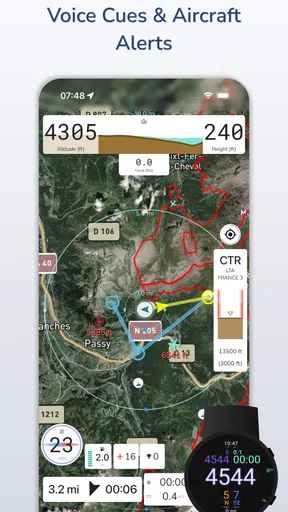
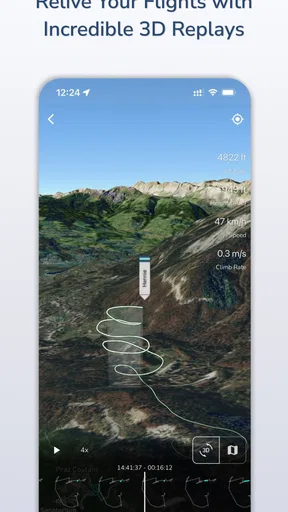
Before relying on any flying app, I want to know what it actually lets me do and what I should still handle elsewhere. Gaggle Paragliding, Ultralight is a free sports app from Viszen for pilots who want flight recording, a vario, airspace alerts and three-dimensional replays in one place. Its focus is practical: supporting a flight and making it easier to look back afterward. I would treat it as a useful tool in a pilot’s kit, not as a replacement for training, sound judgment or dedicated safety equipment.
What the flying workflow is best suited to
The app makes the most sense when I want to connect preparation, time in the air and a useful post-flight review. A newer pilot could use a recorded track to revisit a route with an instructor, while a more experienced flyer might find a 3D replay helpful for remembering how a particular day unfolded. That kind of review can prompt better questions than a vague recollection: where did I turn, how did the route develop, and what would I want to check before flying the same area again?
For a realistic weekend outing, I might check the route and airspace before leaving, use the app’s flight-focused tools as part of my setup, then review the track after landing. The value is in having one place to relate the flight to what I planned, rather than relying only on memory. I would still check conditions through sources I trust and follow local guidance; an alert or display should support a pilot’s decisions, never make them on the pilot’s behalf.
Trust, permissions and decisions that remain yours
Airspace alerts and flight recording are sensitive features because they may influence decisions while a pilot is airborne and involve location information. I would take a moment on setup to read any permission prompts and grant only what makes sense for the features I intend to use. If a permission is declined, I would check whether the specific tool I need still works before depending on the app for a flight.
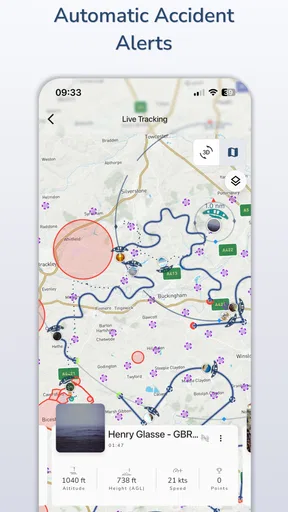
I also would not assume that a flight log is private, public, or shared in a particular way without checking the choices shown in the app. Before uploading or sharing a track, I’d consider whether it reveals a launch site, route, or routine I would rather keep to myself. That simple pause matters for club flights as much as solo ones: a convenient replay can be useful, but sharing should be a deliberate choice.
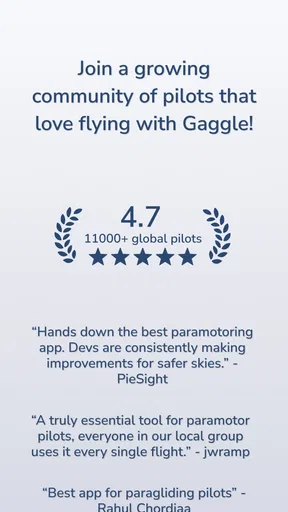
The listing identifies the app as suitable for teens, and it has a 4.6 average from around 915 ratings, with over 10,000 installs. Those figures suggest that other users have found a reason to try it, but they cannot tell me whether it fits my equipment, flying style, or comfort with sharing. I’d judge it through the actual controls and workflow I see on my device, rather than treating popularity as a safety endorsement.
Useful trade-offs before takeoff
One practical habit is to separate preparation from in-flight attention. I would set up the route, check any relevant alerts and confirm that the display is readable before launching, rather than trying to explore menus while managing the wing. A feature-rich screen is only helpful if it reduces workload; if it distracts me, I’d simplify what I use and keep my attention on flying.
Worth Reading Before You Choose

Switching to Android Auto Means Rethinking Your Driving Routine

Google Calendar Makes a Crowded Week Easier to Manage

Baby Panda World Brings Quick Play to Modern Phones, but Its Game Library Feels Busy

ESPN’s Live Game View Makes Following Close Games Easier

QuizzLand Review: A Good Fit for Short Trivia Breaks, Not Every Player

Basketball Stars: Multiplayer Is Fast, but Can It Recover When Matches Go Wrong?
Offline maps can matter in remote flying areas, but downloading them ahead of time is different from assuming every connected feature will work without a signal. I’d prepare maps before leaving coverage and avoid relying on live information where connectivity is uncertain. Likewise, a recorded track is useful only if the phone is positioned and powered in a way that works for the pilot’s setup. I would test the workflow on the ground before making it part of a flight routine.
Compared with a basic GPS track recorder, Gaggle’s appeal is the combination of flight-specific functions and replay rather than merely saving a route. Compared with dedicated instruments, a phone app may be more convenient to review and carry, but I would not presume it offers the same visibility, battery endurance or reliability in every cockpit. Pilots who already have a trusted vario and navigation setup may use Gaggle as a companion and debriefing tool; those seeking a single, proven instrument should compare it carefully with their existing equipment.
Getting Started with Gaggle Paragliding, Ultralight
So, first things first, downloading Gaggle Paragliding, Ultralight was a breeze. Available on both Android and iOS, the installation was smooth, and within no time, I was ready to explore the app’s features. The interface is pretty intuitive, which is great because who wants to fiddle around with complicated menus when you’re itching to get into the sky?
Once you open the app, you’re greeted with a dashboard that’s as inviting as a clear blue sky. The home screen gives you quick access to the primary features, and I appreciated how everything is neatly organized. It’s like having a personal flight assistant right in your pocket!
Flight Planning Made Easy
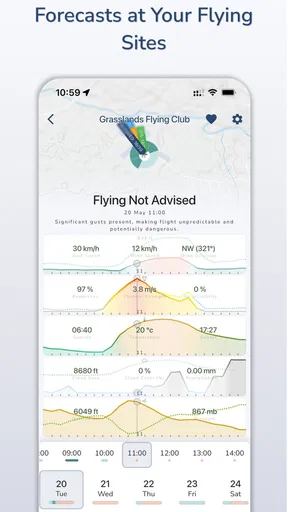
One of the standout features for me was the flight planning tool. Whether you’re a newbie or a seasoned pilot, planning your route is essential, and this app makes it incredibly easy. You can map out your paths, set waypoints, and even get weather updates. Let me tell you, having real-time weather data while up in the air feels like having an ace up your sleeve.
The app also provides detailed maps that you can download for offline use. This is a lifesaver when you’re flying in areas with spotty internet. The maps are detailed and accurate, helping you navigate through different terrains with confidence.
Tracking Your Flights
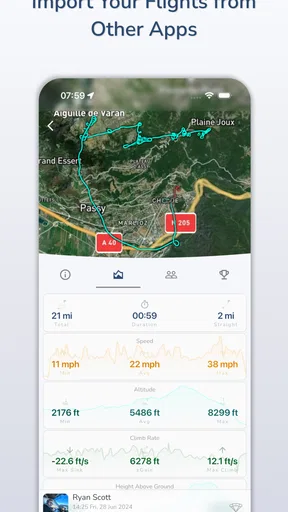
Tracking your flight is another area where the app shines. During my test flights, I was amazed at how accurately the app logged my routes, altitude, and speed. Post-flight analysis is a breeze, allowing you to review your flight path and see where you can improve. It’s like having a debriefing session with yourself, and trust me, it’s incredibly satisfying to see your progress over time.
And oh, the app also integrates seamlessly with several flight instruments. So if you’re already using other gadgets, syncing them with Gaggle is as easy as pie. You can upload your flight logs to the cloud, which is perfect for sharing with friends or your flying club.
Community and Social Features
Flying can sometimes feel like a solitary adventure, but with Gaggle, you’re never really alone. The app has a vibrant community feature that lets you connect with other pilots. You can share your flight experiences, discuss strategies, or even plan group flights. It’s a fantastic way to learn from others and make new friends who share the same passion.
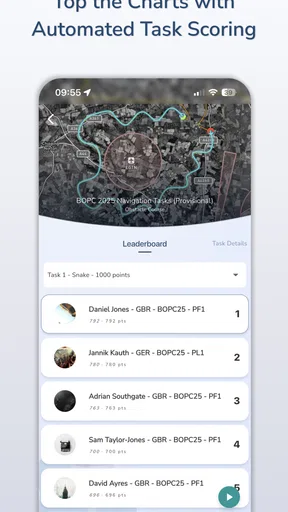
There’s also a leaderboard that adds a fun competitive edge. It’s pretty motivating to see your name climb up the ranks as you log more flights. Plus, it’s a great way to challenge yourself and push your limits.
Navigation and Interface
Now, let’s talk about navigation and interface. As I mentioned earlier, the app is user-friendly, but what really stands out is its responsiveness and design. The visuals are crisp, and the icons are self-explanatory, which makes it easy to find what you need without any hassle.
During my time using the app, I didn’t experience any crashes or glitches. Everything ran smoothly, which is crucial when you’re relying on the app mid-flight. It’s clear that the developers put a lot of thought into ensuring a stable and reliable experience.
Costs, limitations and who should choose it
The app is free to download, with in-app purchases ranging from $7.99 to $79.99 per item. I’d explore the free experience first and decide what I actually need before spending anything. For an occasional flyer, that may be enough to judge whether its maps, recording and replay suit their routine. A regular pilot may value a deeper set of tools, but should weigh any purchase against equipment already owned rather than paying for overlapping functions.
I’d recommend trying it if you fly paragliders or ultralights and want a flight-centered companion that can help with planning, recording and reviewing. It may also suit pilots who enjoy comparing routes with friends or discussing a flight with a club. I’d be more cautious if you need a phone app to replace a dedicated instrument, expect every feature to work offline, or prefer not to store or share location-linked flight records. In those cases, a standalone device or a simpler private recorder may be a better fit.
Final Thoughts
In conclusion, Gaggle Paragliding, Ultralight is a must-have for anyone serious about paragliding or ultralight flying. It’s packed with features that are not only useful but also enhance your overall flying experience. From flight planning to tracking and community engagement, this app covers all bases.
Whether you’re a weekend flyer or a full-time enthusiast, Gaggle offers tools that are both practical and enjoyable. It’s like having a co-pilot who’s got your back, ensuring that your adventures are both safe and thrilling.
If you haven’t tried it yet, I highly recommend giving it a go. Who knows, it might just become your new favorite flying companion. Happy flying!
Pros
- Intuitive interface for easy navigation.
- Real-time weather updates enhance safety.
- Extensive tutorials for beginners.
- Customizable flight plans available.
- Offline mode for remote locations.
Cons
- Limited free features; in-app purchases needed.
- Requires stable internet for full functionality.
- Battery drain during extended use.
- Occasional lag on older devices.
- No support for group flight coordination.
FAQs for Gaggle Paragliding, Ultralight
What is Gaggle Paragliding, Ultralight, and what does it offer?
Gaggle Paragliding, Ultralight is an app designed for paragliding enthusiasts and ultralight pilots. It offers real-time tracking, weather updates, flight logging, and community features. Users can plan flights, connect with other pilots, and enhance their flying experience through detailed analytics and interactive maps.
Is Gaggle Paragliding, Ultralight compatible with both Android and iOS devices?
Yes, Gaggle Paragliding, Ultralight is available for both Android and iOS platforms. It can be downloaded from the Google Play Store and Apple App Store. Ensure your device meets the app's system requirements for optimal performance and access to all features.
How does Gaggle ensure the safety of its users during flights?
Gaggle prioritizes safety by providing real-time weather updates, airspace alerts, and GPS tracking. Users can share their live location with friends and family for additional safety. The app also includes community support where pilots can share tips and advice to promote safe flying practices.
Are there any costs associated with using Gaggle Paragliding, Ultralight?
Gaggle Paragliding, Ultralight offers a free version with basic features. However, for advanced functionalities like detailed flight analysis, premium weather data, and ad-free experience, users can opt for a subscription model. Check their pricing plans on the app's official page for detailed information.
Can I use Gaggle Paragliding, Ultralight offline?
Some features of the app, such as flight logging and previously downloaded maps, are available offline. However, real-time features like live tracking and weather updates require an internet connection. It's recommended to have a reliable data plan for the best experience.


